Showing posts with label Tutorial. Show all posts

Monday, August 10, 2015

MY BESTIES DT: COLORING FOLDS AND TRANSLUCENT CLOTHING


Coloring is all about creativity and finding new ways to bring your images alive.  I like exploring to find something new, even if it is just new to me trying it out.  Coloring folds and translucent clothing is something that I have wanted to incorporate when I color My Besties because the clothing is so fun and usually has tons of layers


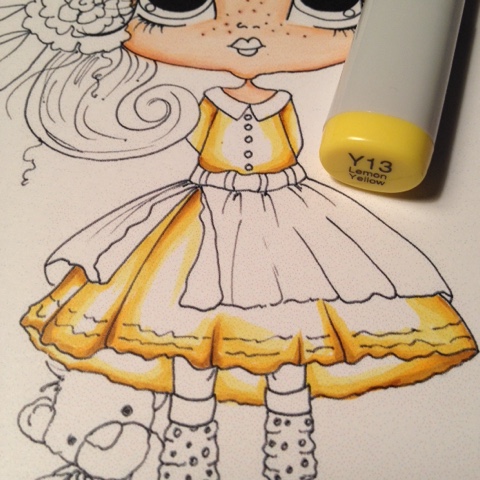
When I color I flip flop between starting with my dark colors first and other times I start with my light colors.  Her I have outlined where I wanted my folds to be placed


Going over my first color and flicking out into the white space


Continue...


Continue...


and continue even further, finally going over the whole image with Y00 to blend in all the colors.  At this point I allow Y00 to fully dry and add repeat with previous colors where I want to add more depth


Using this last color, go over the whole apron allowing all colors to blend.  Once this color is dry repeat using the previous color to deepen the shadows


Using the lightest color Y00 I color in the apron not taking the color to the edges, leaving white space.
Using my top coat I went with W00 and went over the whole apron not alot because I did not want to have the 2 colors blend


Shop this image here

Thank you for stopping by the blog...where "creating something handmade" is always fun

SKIN:  E000, E00, E11, E21
HAIR:  E33, E35, E37, E39, E49
EYES:  YG91, BG93, BG96
LIPS:  R22
DRESS:  Y00, Y11, Y13, Y15, Y17, YR23, 
B95, B97, B99
W00, W0, W1, W2
TEDDY BEAR:  E000, E11, E21, E51
BOW:  YELLOW COMBO
FLOWER:  RV17, RV19
DEEP SHADOWS:  WALNUT STAIN DISTRESS INK
CHEEKS:  CHALK

Monday, June 1, 2015

CREATING READY MADE CARDS FOR THE NEXT OCCASION


In my mind I try and imagine what more, what next, how can I use a My Bestie image this time?  Well today I thought about making the image smaller, changing the color and then making some blank stationary so that when I needed a quick card I would be ready.  You can purchase this image by clicking here


Not quite a 5 minute project, but for sure less than 30.  To get perfect placement for the actual card, I first printed an image for my template onto a piece of printer paper.  I secured the card panels one by one on top of the printed image, giving me perfect placement and then re-ran it through the printer.  I did not want the image to be in black so I changed the color to a shade of grey to give it a softer look.  I offset the image so that I will have room to add a sentiment later, a  few color blocks with some ribbon and just like that I have some ready made blank cards for the next the next occasion.   


Thank you for stopping by the blog today and until next time enjoy
"creating something handmade"

Deirdre


Monday, May 18, 2015

DEEP SHADOWS AROUND THE IMAGE

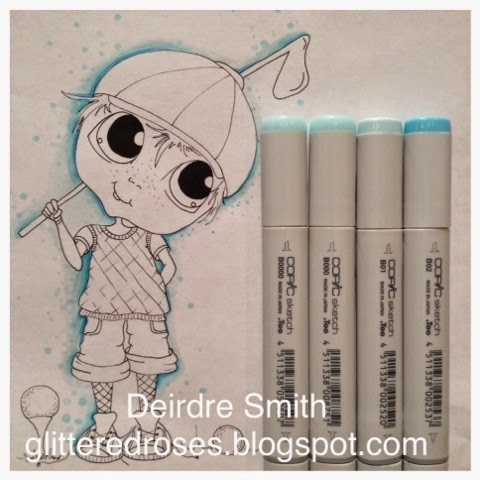
Coloring with for me is about the little details, the little things that make and image pop and come alive.  Today I wanted to share a quick tutorial for creating shadows using my Copic Markers.  This image can be purchased in Sherri Baldy's Etsy shop, click here


B02
I wanted to have the shadows appear to be in the very back of this image so I started with my darkest color and outlined in random areas that would bring the image forward


B01

Going over the first color and out, I wanted to blend and soften the first color, coming in with random dots using the tip of the marker


B000; B0000

Using these 2 color back to back these are the lightest colors again going over lightly the previous colors I just extended the shadow out  and adding more random dots


B02; B01, B000; B0000

Using all 4 colors I added and did my touch ups, and even without adding the color to the actual image upi can see how the shading gives the appearance of the image coming off the page.

Thank you so much for stopping by the blog today and if you would like to purchase this image click here to go directly to the shop

xoxo Deirdre


Related Posts Plugin for WordPress, Blogger...